
When Work IQ was introduced, most people focused on one idea: Copilot was becoming smarter because it could understand more about how an organisation works. But if you look past the keynote and read the architecture details, the bigger story is not just intelligence. It is control. Microsoft designed Work IQ to manage who can use that intelligence, what they are allowed to do with it, and how every action is recorded and checked. In simple terms, Work IQ makes governance something organisations need to actively manage, not something that stays hidden in the background.
What is Work IQ? (The Three-layer Version)
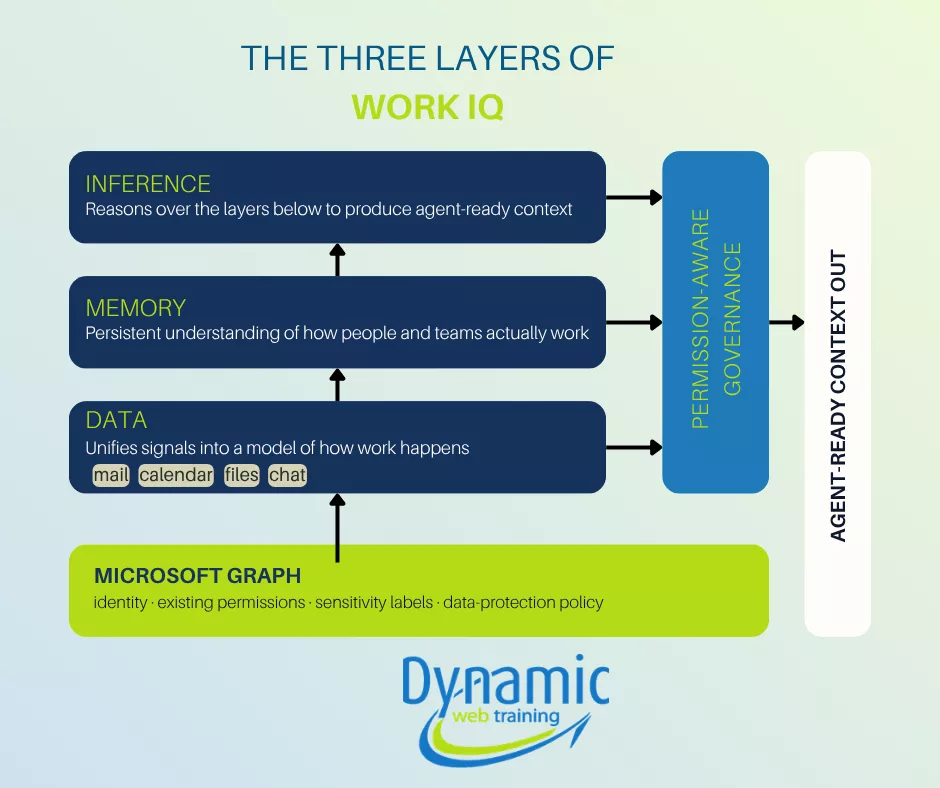
Architecturally, Work IQ is three layers stacked on top of Microsoft Graph.
Data: It unifies signals from files, email, meetings, chats and line-of-business systems into one model of how work happens in your tenant. Not the documents themselves. It works on the patterns indicating who works with whom, how approvals flow, what’s connected to what.
Memory: It builds persistent understanding of how people and teams operate, so an agent stays aligned to priorities and consistent across tasks, apps and sessions. This is what turns a stateless chatbot into something that behaves like it has institutional knowledge.
Inference: It reasons over the first two layers to produce agent-ready context on demand, so an agent doesn’t have to stitch together raw signals or run its own retrieval pipeline.
The reason this matters for governance: It must attach to all three layers, not just the data. It isn’t enough to control which files an agent can read. It must control what they can infer and what they can remember. Most security models were built for the data layer only. Work IQ forces the conversation up a level.
The One Distinction That Changes Everything: Discoverable Vs. Extractable
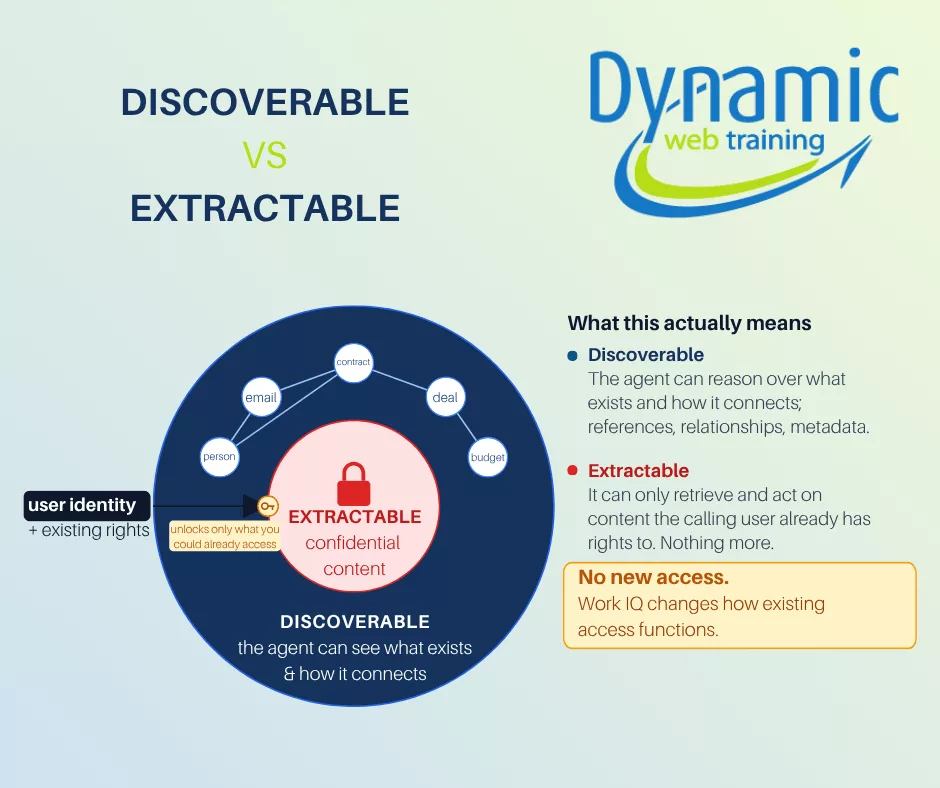
Work IQ helps an agent understand how information is connected without showing protected content it should not access. For example, an agent may know that a contract exists, that it is linked to a deal, that certain people worked on it, and that it connects to a budget item. But if the user does not have permission to view the contract, the agent cannot pull or reveal the confidential text inside it.
This is the difference between discoverable and extractable. Discoverable means the agent can understand that information exists and how it connects to other things. Extractable means the agent can actually open, retrieve, and use the content.
Work IQ does not create new access. It inherits the exact permissions, sensitivity labels and data-protection policies that already govern your Microsoft 365 data. An agent can only extract what the user it’s acting for could already extract. Work IQ changes how existing access functions; it doesn’t widen it.
Work IQ surfaces your governance gaps instead of hiding them. If a document has a misapplied sensitivity label or an over-broad permission, Work IQ will faithfully expose it. The fix isn’t to restrict the intelligence. It’s to fix the data at the source.
Implicit Vs. Explicit: The Moment Governance Becomes Your Job
Microsoft draws a hard line here, and it’s worth making the centre of your thinking.
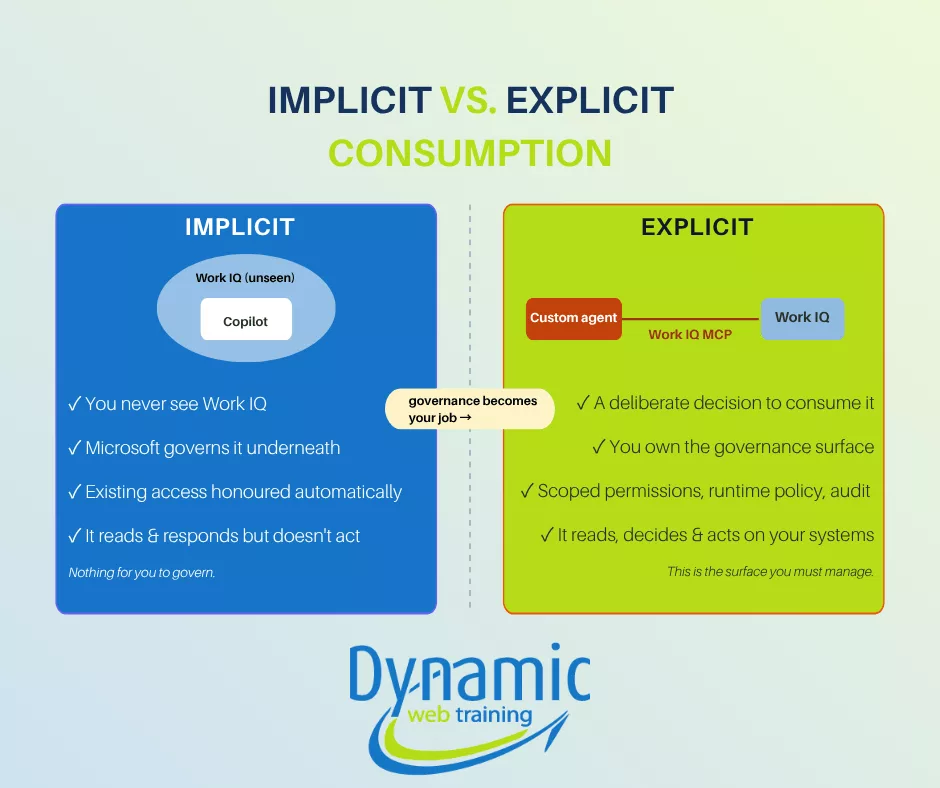
Inside Copilot, when you ask it to draft an email or summarise a meeting; Work IQ runs implicitly. You never see it. Microsoft owns the security underneath, access is honoured automatically, and you simply get answers that understand your business. There’s nothing for you to govern because the boundary is the Copilot product itself.
The moment you build a custom agent that uses Work IQ through an MCP server, which is simply a standard way for an AI agent to connect to another system, that intelligence becomes explicit. You’ve made a clear decision: you want your agent to understand your organisation’s work patterns and act on them. From that point on, you own a new responsibility because the agent can do more than answer questions. It can update systems, change files, and approve requests.
That transition, implicit to explicit, is the exact point where governance stops being Microsoft’s problem and becomes yours.
MCP: Ten Tools Instead of a Thousand Integrations
MCP server acts as a universal adapter. Instead of every agent needing its own custom-built integration for each application, MCP server gives them one common way to discover and connect with a system. It is fast becoming the default way agents talk to tools, and Microsoft has adopted it as the connection layer for Work IQ.
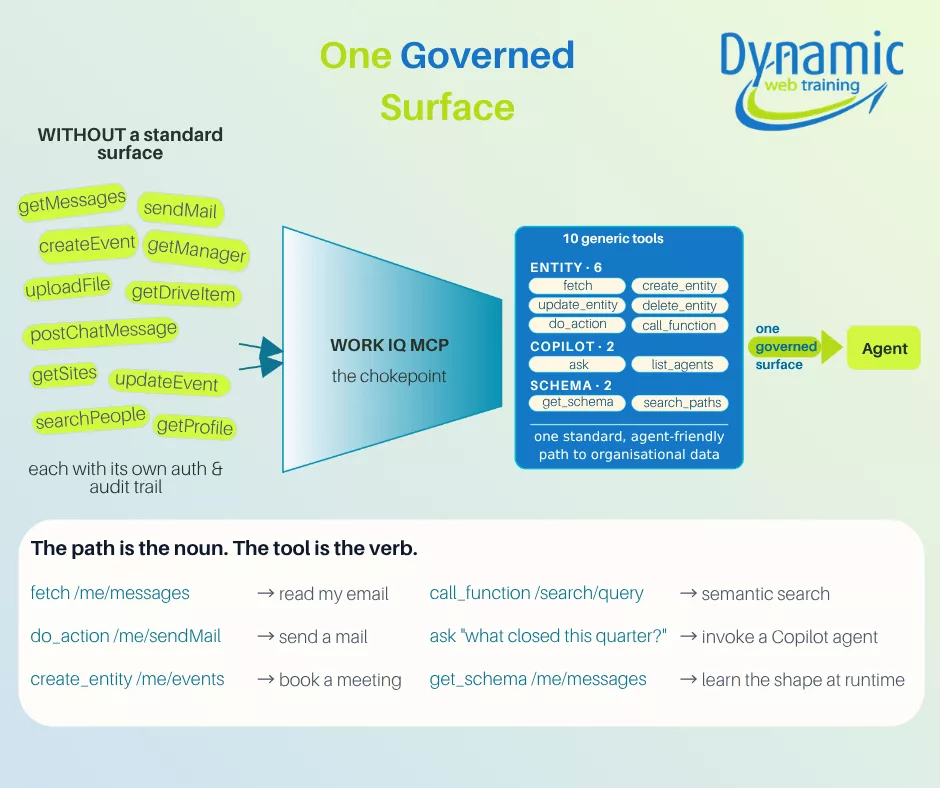
The Work IQ MCP collapses hundreds of underlying Microsoft 365 operations into just ten generic tools. They’re ten verbs that act on resource paths, in three groups:
Entity: fetch, create_entity, update_entity, delete_entity, do_action, call_function;
create, read, update and delete, plus actions and function calls on Microsoft 365 resources.Copilot: ask, list_agents;
invoke Copilot for natural-language reasoning and discover the agents available to you.- Schema: get_schema, search_paths ;
let an agent discover what paths exist and pull their schemas at runtime, instead of preloading thousands of type definitions.
The real benefit is not just that the design looks neat. It is that a small, fixed set of tools is much easier to govern. It would be very hard to manage a thousand custom integrations, each working in its own way. But managing ten standard tools is realistic. Because every call goes through the same place, that is where you can apply policies, set rate limits, and keep clear logs.
Without a standard way to manage them, agents can quickly become difficult to control. Each one may be built on a different system, follow different security rules, and create its own audit trail. That makes it hard to understand how they are all using your data. Work IQ MCP solves this by giving agents one standard path to follow. Every call goes through central governance, and everything can be tracked and audited in one place. It may not be the most exciting part of the architecture, but it is exactly the kind of control enterprises need.
Agent 365: The Control Plane
This is the piece that completes the governance story. Once organisations start building agents, you get agent sprawl, dozens of them, built by different teams, each touching organisational data. Microsoft’s answer is Agent 365, a governance control plane that gives IT centralised authority over which MCP servers agents are even allowed to reach.
In practice, admins run the whole thing from the Microsoft 365 admin centre. Admins can activate or block Work IQ MCP servers across the organization. They can grant agents only the scoped permissions they need; apply runtime policy, rate limits, payload checks and security scans, on every call. They get full tracing of every tool invocation for audit and troubleshooting. Admins can also turn off APIs and MCP connections to cut an agent off whenever they choose.
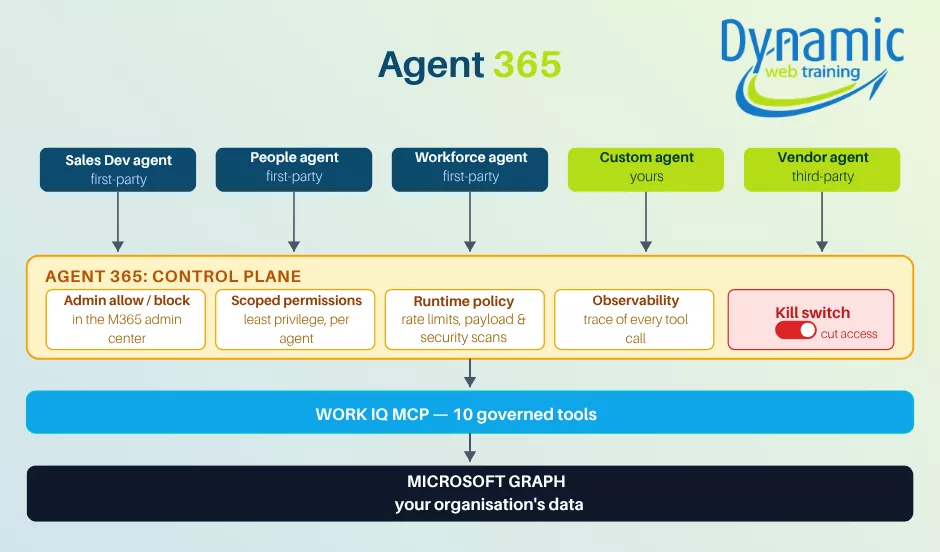
IQ and the Graph
Observability and governance are built into the platform from the start, not added later as an extra layer. Every tool action is logged and checked, which makes it easier to audit activity, understand usage, apply rate limits, and enforce compliance in real time across every agent and data source. In 2026, the teams that succeed will not simply be the ones with the smartest agents. They will be the ones that can run agents safely, clearly, and at scale.
The bottom line
Work IQ is officially about organisational intelligence. Architecturally, it’s about enterprise control. The intelligence is what gets demoed. But the three-layer model, the discoverable-vs-extractable boundary, the ten-tool MCP chokepoint, the Agent 365 control plane and the per-call audit trail all point at the same thing.
Frequently asked questions
No. Work IQ inherits your existing Microsoft 365 permissions. An agent can only reach what the person it’s acting for could already access.
No. Inside Copilot it runs automatically and Microsoft governs it. You only take on governance when you build a custom agent that uses it.
Inside Copilot it’s part of your Copilot licence. For custom or third-party agents, Work IQ API access is billed on usage, separately from Copilot.
Ready to learn Microsoft Copilot? Instructor-led courses in Sydney, Melbourne & Online Live
→ View course dates & book online
Call 1300 888 724 (Monday to Friday, 8:30am–5:00pm AEST) to discuss group training for your leadership team.
