
Microsoft Fabric is a unified software as a service (SaaS) analytics platform that brings data engineering, data warehousing, data integration, real-time analytics, data science and Power BI into one governed environment. Every workload writes to OneLake, a single logical data lake in open Delta Lake format, so one copy of data serves every engine instead of each tool keeping its own.
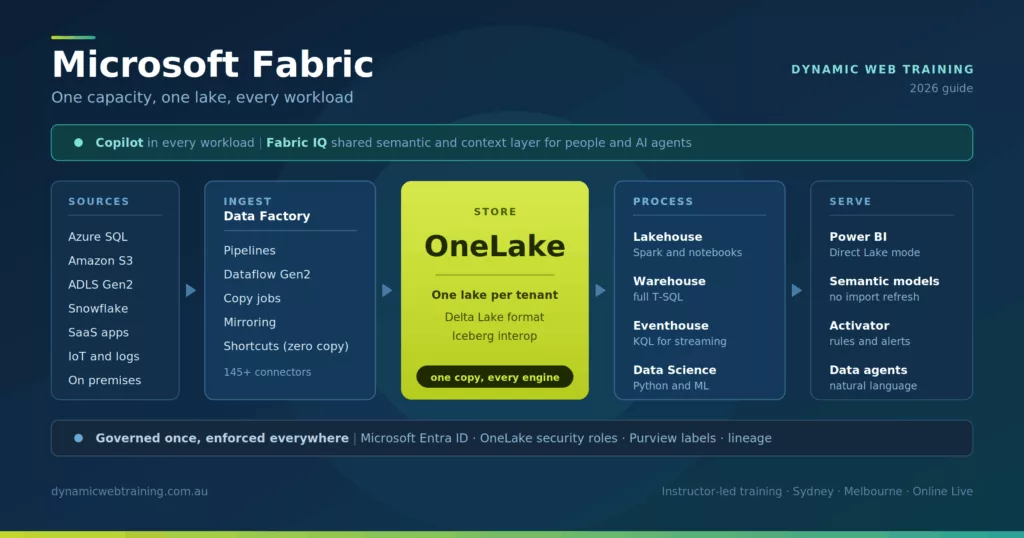
Fabric consolidates capabilities that previously required Azure Data Factory, Azure Synapse Analytics, Azure Data Explorer and Power BI Premium to be bought and wired together separately. You buy one capacity and every workload draws from that pool.
This guide covers each major feature: what it is, why it matters, and where it falls short. The trade-offs are included because the decision to move onto Fabric is rarely a question of whether the features exist. It is a question of whether the gaps matter for your workloads.
Key facts at a glance
| Item | Detail |
|---|---|
| Product | Microsoft Fabric |
| Category | Unified SaaS data and analytics platform |
| Storage layer | OneLake, one logical lake per tenant |
| Native table format | Delta Lake, with transparent Apache Iceberg interoperability |
| Core workloads | Data Factory, Data Engineering, Data Warehouse, Data Science, Real-Time Intelligence, Databases, Fabric IQ, Power BI |
| Licensing model | Capacity based. Capacities are named F plus their capacity units, from F2 to F2048, bought pay as you go or reserved |
| Minimum capacity for Copilot | F2, the smallest paid tier. Trial and free SKUs are not supported |
| Identity and governance | Microsoft Entra ID, Microsoft Purview Information Protection, OneLake security roles |
| Typical users | Data engineers, BI developers, data analysts, data scientists |
What is Microsoft Fabric?
Microsoft Fabric is Microsoft’s unified SaaS analytics platform. It removes the need to assemble separate services for ingestion, storage, transformation, warehousing, streaming and reporting by putting all of them behind one portal, one capacity and one storage layer.
The organising units are workspaces and items. A workspace is assigned to a capacity and holds items: lakehouses, warehouses, notebooks, pipelines, eventhouses, semantic models and reports. Because every item stores its data in OneLake, moving between engines does not mean moving data.
The commercial model is worth understanding before the technical one. Fabric is billed on capacity rather than per seat. Capacities are named F followed by the number of capacity units they provide, so the range runs F2, F4, F8, F16, F32, F64 and upwards to F2048. You assign workspaces to a capacity, and every workload in those workspaces draws from that same pool. The older P-series Premium capacities (P1, P2 and P3) still function, but Microsoft is retiring them and directing customers to the F-series.
| Tier | Capacity units | Why it matters |
|---|---|---|
| F2 | 2 | Smallest paid tier, and the minimum capacity for Copilot |
| F4 to F32 | 4 to 32 | Typical range for small and mid-sized workloads |
| F64 | 64 | Report viewers holding a free Fabric licence no longer need a Power BI Pro licence. Broadly equivalent to the legacy P1 capacity |
| F128 to F2048 | 128 to 2048 | Large enterprise workloads |
That F64 threshold is where most costing exercises land. Below it, every person who opens a report needs a Power BI Pro licence. At F64 and above, viewers with the Viewer role and a free Fabric licence do not, although report authors still need Pro either way.
Capacity is shared across every workload in the tenant that is assigned to it, which means a badly written notebook can slow a report refresh. This is a change in operational discipline for teams used to isolated services.
What is OneLake and why does it matter?
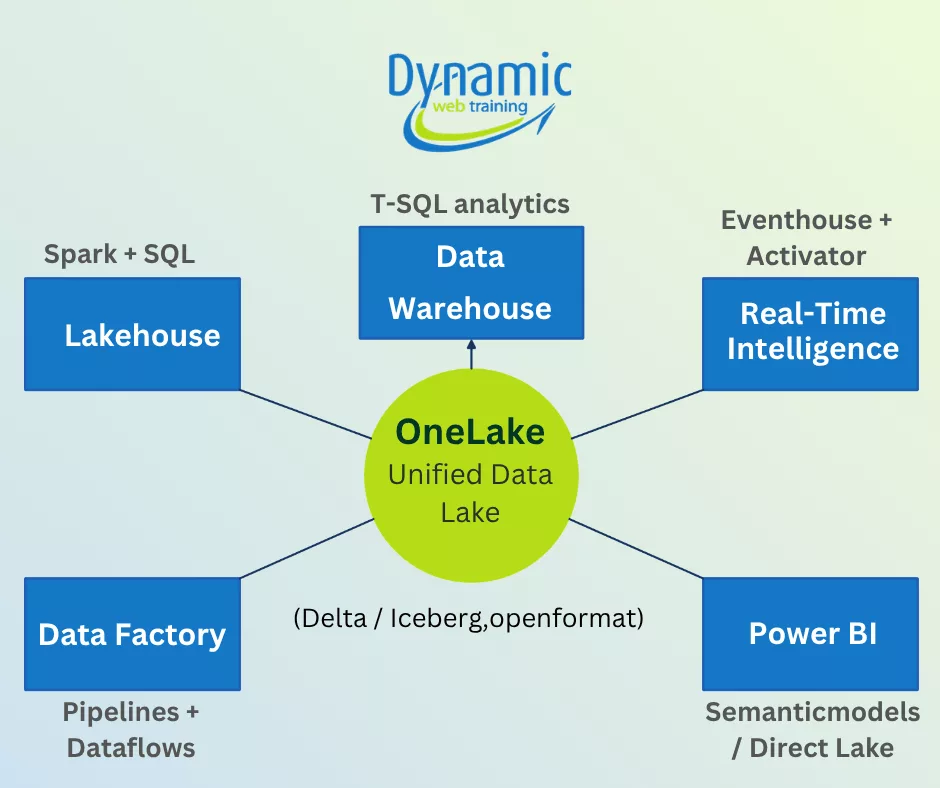
OneLake is Fabric’s single, tenant-wide logical data lake. Every Fabric workload reads and writes to it in open format, which means one copy of data can serve SQL, Spark, KQL and Power BI without duplication, conversion or a separate copy step.
Data reaches OneLake three ways. You can load it directly through pipelines, notebooks or dataflows. You can create a shortcut, which is a zero-copy reference to data held elsewhere: another OneLake location, Azure Data Lake Storage Gen2, Amazon S3, Google Cloud Storage, or on-premises storage through the data gateway. Or you can mirror an operational database, which keeps a near real-time replica of Azure SQL, PostgreSQL, Cosmos DB or Snowflake in OneLake without you building a pipeline.
Delta Lake, a Linux Foundation project, is the default table format, and OneLake now serves those same Delta tables transparently as Apache Iceberg, with an Iceberg REST Catalog endpoint that external engines such as Snowflake, Trino and Dremio can connect to. Snowflake interoperability is generally available, and Azure Databricks can read OneLake data through Unity Catalog. The practical effect is that choosing Fabric for storage does not force you to choose Fabric for every engine.
Governance is the underrated part. Permissions, sensitivity labels and lineage are held at the storage layer, so a rule written once applies whether the user arrives through a SQL endpoint, a Spark notebook or a Power BI report. In a multi-tool estate, that is usually where governance breaks down.
Strengths
- One source of truth, with no copy sprawl between engineering and BI
- Governance applied at the storage layer and enforced across every engine
- Open formats, so data is portable if you later move compute elsewhere
- Zero-copy access to external cloud storage and on-premises data through shortcuts
Watch-outs
- Every workload draws on the same capacity, so sizing has to account for all of them at once rather than workload by workload
- Tables are expected in Delta or Iceberg. Loose Parquet and CSV need converting or accessing through a shortcut
- Some external tools need extra configuration to connect, although OneLake does support the ADLS Gen2 API and SDKs
- Tenant-wide storage means tenant-wide blast radius if workspace permissions are set carelessly
What is a Fabric lakehouse?
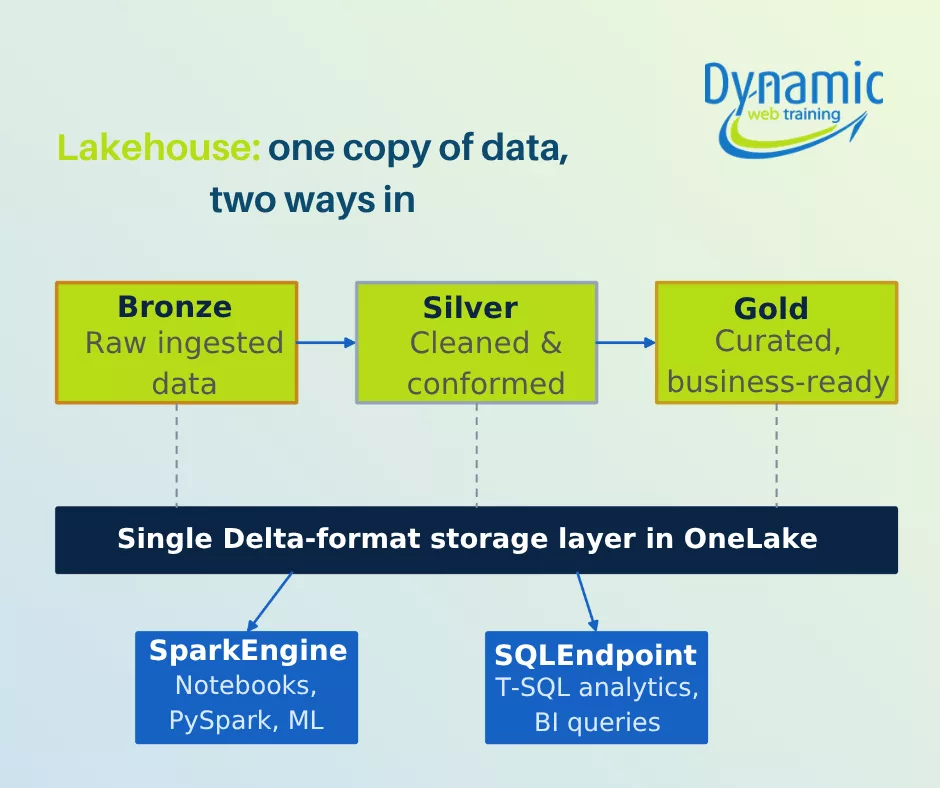
A lakehouse in Fabric is an item in OneLake that combines data lake storage with warehouse-style querying. It holds structured and unstructured data in one place using Delta Lake, and automatically exposes both a Spark endpoint and a read-only SQL analytics endpoint over the same underlying files.
Data engineers ingest and transform with Spark notebooks, pipelines or Dataflow Gen2. Analysts then query the result with T-SQL through the SQL analytics endpoint, or build a Power BI semantic model on it, without anyone creating a second copy. The Delta format underneath provides atomicity, consistency, isolation and durability (ACID) transactions, schema enforcement and time travel, which is what makes warehouse-style behaviour possible on lake storage.
The lakehouse removes the old trade-off between lakes and warehouses. Instead of one copy for machine learning and another for reporting, a single Delta copy serves both.
The term is not a Microsoft coinage. It was set out in a 2021 CIDR paper arguing that open, direct-access formats would eventually replace the two-tier lake-plus-warehouse architecture. Fabric is one of the more complete commercial implementations of that argument, which is worth knowing if you are comparing it against Databricks or Snowflake rather than against your current stack.
Strengths
- One Delta copy serves Spark, SQL and Power BI
- Handles structured, semi-structured and unstructured data in the same item
- Low storage cost relative to a dedicated warehouse
- Direct Lake semantic models can read the tables without an import refresh
Watch-outs
- The SQL analytics endpoint is read-only. Writes go through Spark, pipelines or dataflows. If you need full T-SQL data manipulation and multi-table transactions, use a Fabric warehouse instead
- Heavily transactional workloads still belong in an operational database, not a lakehouse
- Performance depends on capacity sizing and on table maintenance. Small file accumulation degrades query speed until tables are optimised and compacted
- Two teams writing to the same table through different engines will eventually produce a conflict that no amount of Delta cleverness prevents
Medallion architecture in a Fabric lakehouse
A medallion architecture means bronze, silver and gold layers all living within one system. A data engineer lands raw files in the bronze layer with Spark notebooks, cleans and conforms them into silver, then builds business-ready aggregates in gold for analysts to consume in Power BI.
In Fabric this happens without moving data between platforms. All three layers sit on the same Delta storage in OneLake. Spark and the SQL endpoint read the same files rather than separate copies, so lineage stays intact and reconciliation between layers stops being a weekly argument.
Lakehouse vs data lake vs data warehouse
| Aspect | Data lake | Data warehouse | Data lakehouse |
|---|---|---|---|
| Data structure | Raw, unstructured or semi-structured | Highly structured, schema on write | All types, unified by an open metadata layer |
| Typical cost | Low | High | Medium to low |
| Primary users | Data scientists, ML engineers | Business analysts, BI tools | Data scientists, analysts and developers |
| Query performance | Slower ad hoc queries | Very fast for SQL | Fast SQL plus direct access to the lake |
| ACID transactions | No | Yes | Yes, through Delta Lake, Iceberg or Hudi |
| Fabric equivalent | OneLake files, or a shortcut to external storage | Fabric warehouse | Fabric lakehouse |
What does Fabric Data Factory do?
Fabric Data Factory is the built-in data integration workload for extract, transform, load (ETL) and extract, load, transform (ELT) pipelines. It provides data pipelines, Copy jobs, Dataflow Gen2 and mirroring, with more than 145 built-in connectors covering on-premises, multicloud and software as a service sources.
It merges features from Azure Data Factory and Power Query. Pipelines handle orchestration, branching, retries and calls out to notebooks or stored procedures. Dataflow Gen2 gives analysts a low-code Power Query surface for straightforward transformations. Copy jobs simplify bulk and incremental movement. Data Build Tool (dbt) integration is available for teams already working that way, and triggers can be scheduled, event-based through the Real-Time hub, or manual.
The advantage of having integration inside Fabric is that pipelines, notebooks and dataflows all target OneLake tables directly and write in open Delta format by default. There is no separate integration stack to stand up, secure and monitor.
Strengths
- Integration lives alongside analytics, with no separate service to provision
- Large connector library covering on-premises, multicloud and SaaS sources
- ETL and ELT patterns can be mixed freely in the same pipeline
- Output lands in open Delta format in OneLake without a conversion step
Watch-outs
- Azure Data Factory remains the more mature option for very large or unusually complex enterprise pipelines. Fabric Data Factory is newer and still evolving
- Dataflow Gen2 has a wide transform library but does not cover every case, and complex logic belongs in a notebook
- Teams already invested in Databricks or third-party orchestration face real porting work
- Cost is tied to capacity unit consumption, which is harder to forecast than a fixed per-pipeline price
What is Real-Time Intelligence in Microsoft Fabric?
Real-Time Intelligence is Fabric’s streaming workload. It combines eventstreams for ingestion, Eventhouse for storage and query, and Activator for no-code rules that fire when conditions are met. It is designed for telemetry, logs, Internet of Things (IoT) feeds and any data where the value decays within minutes.
Eventhouses are purpose-built Kusto Query Language (KQL) databases optimised for ingesting and querying event streams at scale, with automatic schema inference and storage optimisation. Activator continuously monitors that stream data for patterns and triggers actions when thresholds are crossed: an alert to Teams or email, a pipeline run, a notebook execution, or a Power Automate flow.
The Real-Time hub sits above all of it as a single catalogue of streaming sources across the tenant, which is where most teams start when they are trying to work out what is already flowing before they add more.
Strengths
- Handles high-volume event data that would be expensive to hold in a warehouse
- KQL is fast and expressive for time series, logs and telemetry
- Activator lets business rules be defined without code, then trigger real actions
- Streaming data lands in the same governed estate as everything else
Watch-outs
- KQL is a separate language from T-SQL and Python, and it is a real learning curve for teams who have not used Azure Data Explorer
- Streaming ingestion consumes capacity continuously, not in bursts, which changes how you size
- Activator rules need governance of their own, or you end up with alert fatigue and orphaned triggers
How do security and governance work in Microsoft Fabric?
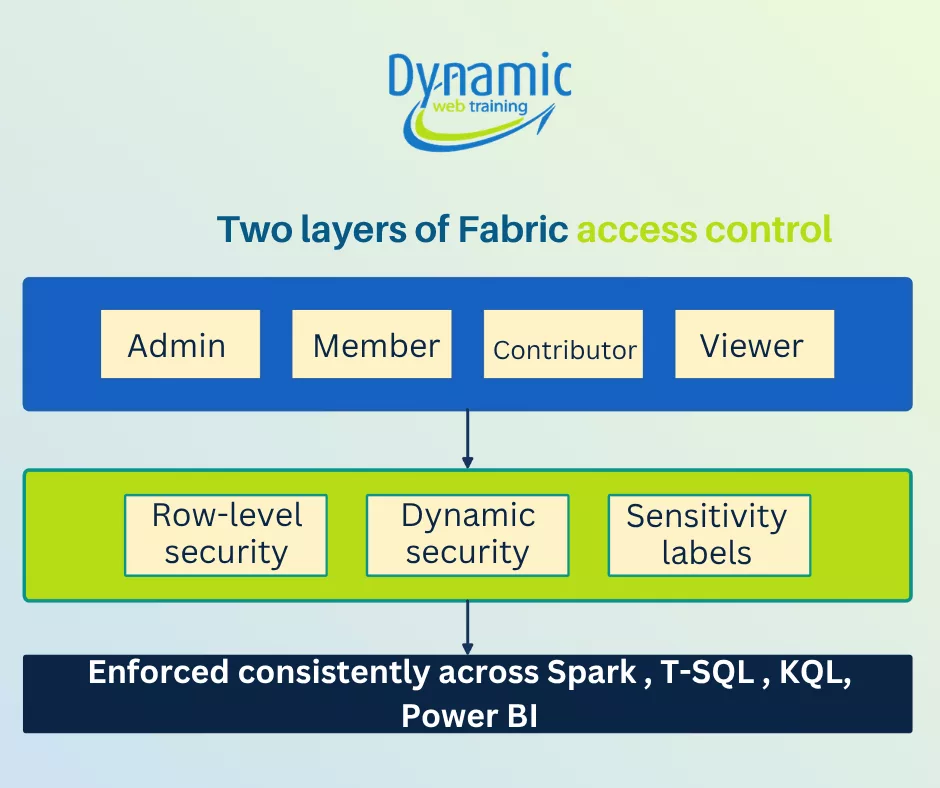
Fabric applies security at two levels. Workspace roles (Admin, Member, Contributor and Viewer) control who can create and manage content. OneLake security roles control which tables, rows and columns a user can read. Both are enforced consistently across SQL, Spark, KQL and Power BI.
Identity comes from Microsoft Entra ID, formerly Azure Active Directory. Fabric integrates with Microsoft Purview Information Protection, so sensitivity labels applied to OneLake items carry encryption and access restrictions that persist even when the data leaves Fabric, for example in an exported Excel file. Lineage views trace a report back through its semantic model, lakehouse tables and source pipelines, which matters when someone asks where a number came from.
Domains give larger organisations a way to group workspaces by business area and delegate administration, so the central data team is not the bottleneck for every access request.
Watch-outs
- Two overlapping permission systems means it is easy to grant broad workspace access and assume data-level rules will contain it. Test with a real low-privilege account before go-live
- Sensitivity labels only help if your Purview taxonomy is already in reasonable shape
What can Copilot do in Microsoft Fabric?
Copilot in Fabric provides generative AI assistance inside each workload: code suggestions and error fixes in notebooks, pipeline generation and transformation explanations in Data Factory, natural language to SQL in warehouses, KQL generation in Real-Time Intelligence, and report building, page summaries and DAX help in Power BI.
Because Copilot runs inside Fabric, it reads your workspace context without manual setup and respects the security context of the user asking. It will not surface data the user could not otherwise see. In notebooks it also surfaces performance guidance, such as flagging operations that will cause an expensive data shuffle, alongside the code it suggests.
What Copilot in Fabric requires
- A paid Fabric capacity at F2 or higher, which is the smallest paid tier, or a legacy Power BI Premium capacity at P1 or higher. The requirement was previously F64, which put Copilot out of reach for smaller teams
- Pro and Premium Per User licences alone do not enable it. Copilot needs organisational capacity
- Trial and free SKUs are not supported
- Tenant settings and capacity settings both have to be switched on. The Copilot button can appear while remaining non-functional if either is missing
- A supported region. The Azure OpenAI service behind Fabric Copilot is deployed in US datacentres and within the EU data boundary, so Australian tenants generally need the tenant setting that permits data to be processed outside the tenant’s geographic region. Confirm this with your security team before you plan a rollout
These rules have changed more than once, so check the current position in Microsoft’s Fabric Copilot capacity documentation before you commit to a capacity size.
Watch-outs
- Copilot usage consumes capacity units, so heavy use competes with refreshes and queries on the same capacity
- Generated DAX, SQL and KQL still needs review. It is a drafting accelerator, not a substitute for understanding the model
- Output quality depends heavily on how well the semantic model is named and documented. Copilot cannot infer meaning from a table called Table1
What is Fabric IQ?
Fabric IQ is Fabric’s semantic and context layer. Announced at Microsoft Ignite in November 2025 and made generally available at Microsoft Build in June 2026, it sits above OneLake and gives both people and AI agents a shared definition of business entities, metrics and the relationships between them.
The problem it addresses is semantic drift. Marketing counts a customer as anyone who downloaded a whitepaper, sales counts anyone with an active contract, and finance counts anyone whose first payment has cleared. Same word, three definitions, and every cross-functional dashboard inherits the disagreement. Fabric IQ makes those definitions explicit and shared.
It is delivered through several items. Semantic models supply trusted measures. Ontology, still in preview, defines the shared business language over those measures. Graph powers relationship and impact analysis. Plan turns insight into coordinated action. Data agents and operations agents provide concept-aware interaction over live and historical data.
For most teams, Fabric IQ is not a day one concern. It becomes relevant at the point where you start pointing AI agents at your data and need them to reason in business terms rather than table names.
Because this is the newest and most heavily marketed part of Fabric, it is worth reading outside the vendor material. Data architect James Serra’s summary of the Build 2026 announcements gives a practitioner view, and Constellation Research covers how Fabric IQ fits into the wider Microsoft IQ strategy.
How does Power BI fit into Microsoft Fabric?
Power BI is a first-class Fabric workload rather than a separate product. Lakehouses, warehouses and OneLake files are native sources, and Direct Lake mode lets a semantic model read Delta files in OneLake directly, without an import refresh and without translating queries back to a source system.
Direct Lake is the reason the Fabric and Power BI story hangs together. It gives close to import-mode performance on data volumes that would previously have forced you into DirectQuery, and it removes the refresh window entirely. When it cannot serve a query, for example because a feature is unsupported or the model exceeds the capacity guardrails, it falls back to DirectQuery rather than failing.
| Mode | How data is read | Refresh | Best for |
|---|---|---|---|
| Import | Copied into the model in memory | Scheduled refresh required | Smaller models where you need every DAX and Power Query feature |
| DirectQuery | Query sent to the source at report time | No refresh, always live | Very large sources, or where data must not be copied |
| Direct Lake | Delta files in OneLake read directly into memory | No refresh, updates as the table updates | Large Fabric lakehouse or warehouse tables where you want import-like speed |
Data produced anywhere in Fabric, whether by a dataflow, a notebook or a pipeline, feeds into Power BI reports without an export step. For organisations already running Power BI, this is usually the most familiar entry point into Fabric, and the one where the value is easiest to demonstrate.
Which Fabric workload should you use?
The most common early mistake is putting a workload in the wrong item and then fighting the platform. The table below covers the decisions teams make in their first few months on Fabric.
| If you need to | Use |
|---|---|
| Land raw files and transform them with Spark or notebooks | Lakehouse |
| Write full T-SQL with multi-table transactions and data manipulation | Warehouse |
| Move data from many sources on a schedule | Data Factory pipeline or Copy job |
| Give analysts a low-code transformation surface | Dataflow Gen2 |
| Replicate an operational database with no pipeline | Mirroring |
| Reference data held in S3 or ADLS Gen2 without copying it | OneLake shortcut |
| Query high-volume event, log or telemetry data | Eventhouse and KQL |
| Trigger an action when a threshold is crossed | Activator |
| Give AI agents shared business definitions | Fabric IQ |
| Report on large tables without an import refresh | Power BI Direct Lake |
What are the main limitations of Microsoft Fabric?
Fabric is a strong platform with four constraints that catch most teams in the first year.
- Capacity contention. Every workload draws from the same pool. Fabric smooths bursts over time, but sustained overuse leads to throttling that presents as slow reports rather than an obvious error. Monitoring the Capacity Metrics app is not optional.
- Feature maturity. Fabric Data Factory does not yet match Azure Data Factory for the most complex enterprise pipelines, and the warehouse does not match a mature dedicated SQL pool on every workload. Check your specific requirements rather than assuming parity.
- Cost forecasting. Capacity unit consumption is harder to predict than per-service pricing, particularly once Copilot and streaming are in the mix. Run a real workload on a trial or an F2 before committing to a reserved capacity.
- Skills. Fabric asks one team to work across T-SQL, Python or PySpark, KQL, DAX and Power Query. Very few teams have all five. This is the constraint that most often stalls a rollout, and it is the one least likely to appear in a vendor evaluation.
Getting your team ready for Fabric
The organisations that get value from Fabric tend to follow the same pattern: a small group of users first, a short period of structured hands-on training on real workloads, and a checkpoint before the platform is opened up more widely. The ones that struggle move straight from buying capacity to hoping people work it out.
Most teams find the practical entry point is Power BI, because the reporting layer is where the value shows up first and where existing skills transfer. From there, Data Factory and the lakehouse follow naturally.
Where Dynamic Web Training fits in
We run instructor-led Power BI training in Sydney, Melbourne and Online Live across Australia, covering data modelling, DAX and report design: the skills that determine whether a Fabric investment produces anything useful. The full package also prepares you for the Microsoft PL-300 Power BI Data Analyst exam. We also run Microsoft Copilot training for teams whose Microsoft 365 renewal has just added Copilot seats, built around real Word, Excel, PowerPoint and Outlook workflows.
Conclusion
Microsoft Fabric brings data engineering, data integration, real-time analytics, business intelligence and data science into a single SaaS platform. OneLake, lakehouses, Data Factory, Real-Time Intelligence, Fabric IQ, Direct Lake and Copilot each solve a real problem, and together they remove most of the copying and reconciliation that made previous stacks expensive to run.
The platform is not the hard part. Capacity discipline and skills are. Teams that plan for both get the benefit that the architecture promises. Teams that plan for neither end up with the same silos in a newer interface.
Frequently asked questions
Microsoft Fabric is used to run an entire analytics estate in one platform: ingesting data, storing it in OneLake, transforming it with Spark or SQL, analysing streaming events, and reporting on it in Power BI. It replaces the need to buy and integrate separate Azure data services.
No. Power BI is a workload inside Microsoft Fabric, not a product being retired. Existing Power BI reports, semantic models and workspaces continue to work. Fabric adds data engineering, warehousing and streaming capabilities around Power BI and introduces Direct Lake mode for reading OneLake data directly.
A lakehouse stores Delta files and exposes a read-only SQL analytics endpoint alongside a Spark endpoint. A warehouse offers full T-SQL, including data manipulation and multi-table transactions. Use a lakehouse for engineering and mixed data types, and a warehouse when you need transactional SQL behaviour.
Fabric covers most of what those services do, but not all of it. Azure Data Factory remains stronger for very large or unusually complex enterprise pipelines. Microsoft positions Fabric as the strategic direction, so check your specific requirements against Fabric Data Factory before migrating.
Copilot needs a paid Fabric capacity of F2 or higher. Fabric capacities are named F followed by the number of capacity units they provide, so F2 is the smallest paid tier. Power BI Pro and Premium Per User licences alone are not sufficient, trial capacities are excluded, and tenant and capacity settings must both be enabled.
Fabric capacities are named F followed by the number of capacity units they provide, running from F2 up to F2048. F2 is the smallest paid tier and the minimum for Copilot. F64 is the threshold at which report viewers holding a free Fabric licence no longer need a Power BI Pro licence.
Yes. Fabric capacities can be provisioned in Australian Azure regions. However, the Azure OpenAI service behind Fabric Copilot runs in US datacentres and the EU data boundary, so Australian tenants usually need to enable the tenant setting permitting processing outside their geographic region for Copilot to work.
Direct Lake lets a Power BI semantic model read Delta tables in OneLake directly into memory, with no scheduled refresh and no query translation to a source system. It delivers close to import-mode performance on large tables and falls back to DirectQuery when a query cannot be served.
Fabric is priced on capacity rather than per user. Capacities are named F followed by their capacity units, running from F2 upwards, and are bought pay as you go or reserved for a year at a discount. Prices vary by Azure region. Below the F64 tier, report viewers still need Power BI Pro licences.
It depends on the role. Analysts can work entirely in Power BI, Dataflow Gen2 and the SQL analytics endpoint without Python. Data engineers generally need PySpark. Real-Time Intelligence requires KQL. Most teams need T-SQL and DAX as a minimum across the group.
